
IT automation services turn repeatable support and infrastructure tasks into documented workflows that run with defined permissions, checks, and escalation rules. For a growing business, the useful result is fewer manual handoffs: accounts are ready when staff start, routine faults receive a consistent response, and engineers spend less time repeating the same fixes.
This guide helps IT leaders and operations managers decide what to automate first, what a provider should deliver, and how to measure whether the work is paying off.
What do IT automation services include?
A service engagement can include process discovery, workflow design, integration with existing systems, testing, deployment, monitoring, and ongoing maintenance. The scope should explain which tasks are covered and who responds when an automated action fails.
Buying a tool is only one part of that work. Someone still needs to understand the process, maintain access permissions, update integrations, and confirm that each workflow produces the intended result. Ask for those responsibilities in writing.
It also helps to distinguish three related ideas:
- Task automation: software performs a defined action, such as collecting device inventory.
- Orchestration: multiple tasks are coordinated across systems, such as creating an account, assigning approved access, and updating a service ticket.
- AIOps: AI-based analysis can help interpret operational data and identify issues; the actions that follow still need controls and ownership.
Red Hat’s explanation of orchestration describes the coordination of multiple automated tasks. For buyers, the practical question is whether a provider handles the complete workflow, including exceptions, or only an isolated step.
For the broader operational scope, review our Managed IT 360 services. Teams exploring AI-assisted monitoring can also review AI as a Service.
Six practical IT operations automation use cases
Start with a recurring task that has reliable inputs and a clear definition of success. These examples are candidates to evaluate against your environment, rather than a promise that every system supports the same integrations.
| Workflow | What can be automated | What needs control |
|---|---|---|
| Employee onboarding | Create accounts and assign approved role-based access from an authorized request. | Manager approval, correct start date, and a check that access matches the role. |
| Employee offboarding | Disable access and record completion across connected systems. | Authorized timing, session handling, and retention requirements before deleting data. |
| Patch coordination | Inventory versions, schedule approved deployments, and collect results. | Pilot groups, maintenance windows, application testing, and recovery steps. |
| Backup monitoring | Detect failed jobs, perform a bounded retry where appropriate, and escalate persistent failures. | Independent restore testing; a successful backup job does not prove recovery works. |
| Routine incident response | Collect diagnostics and execute a tested fix for a known condition. | Preconditions, retry limits, and escalation when service health does not recover. |
| Cloud housekeeping | Report unused resources or stop approved nonproduction workloads on a schedule. | Resource ownership, exclusions, and explicit approval before deletion. |
Identity workflows need particular care because an incorrect entitlement can spread across several applications. Our identity and access management guide explains the surrounding access-management decisions.
How to choose your first automation workflow
Review recent tickets with the people who actually resolve them. Record the trigger, systems involved, manual steps, time spent, exceptions, and owner. A frequently repeated five-minute task with predictable inputs may be a better pilot than a rare outage with many possible causes.
Choose a first workflow that meets these conditions:
- The process is understood. Two engineers can follow the same written steps and reach the same result.
- The inputs are dependable. Account identifiers, asset records, and approval information are available and checked.
- The impact is bounded. A failure can be contained to a small pilot group or nonproduction environment.
- Success is observable. The workflow can verify the desired state instead of merely reporting that a command ran.
- An owner is available. Someone can resolve exceptions and approve changes to the workflow.
If one of these is missing, fix the process before expanding automation. Documenting why a task sometimes fails is useful progress: it prevents the same mistake from being repeated faster across more systems.
A practical rollout sequence
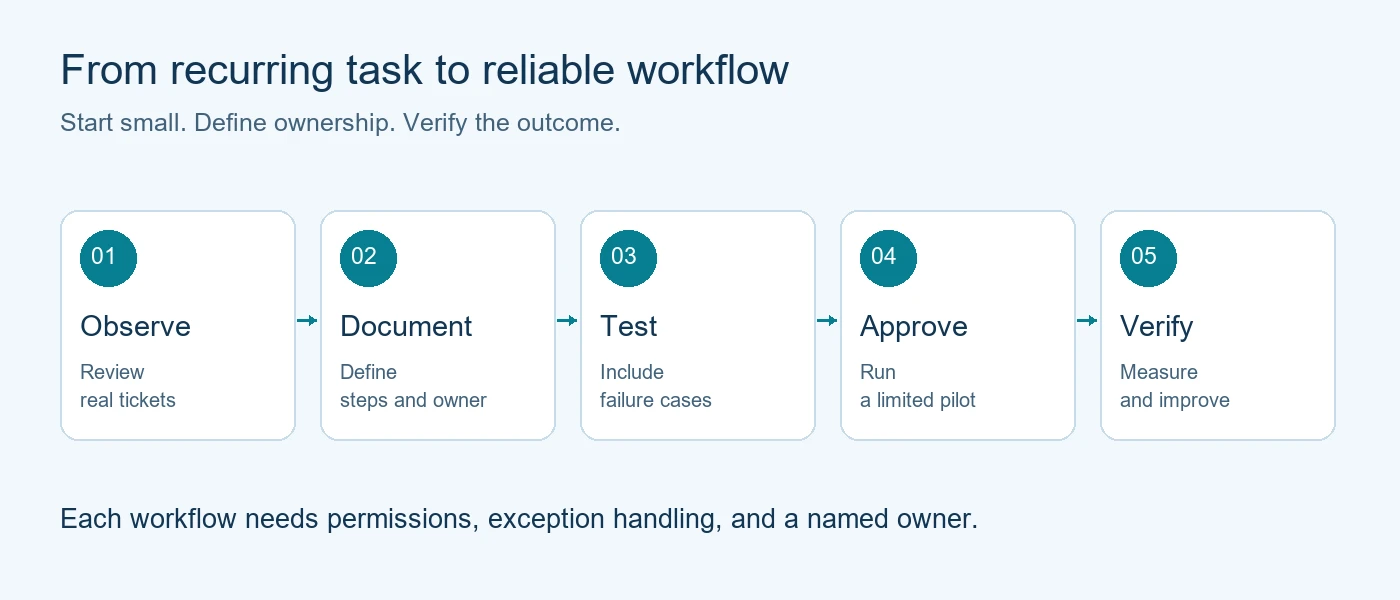
First, observe the manual process and establish a baseline. Next, build and test the workflow using representative cases, including missing inputs and unavailable systems. Run a limited pilot with human approval, compare its output with the expected result, and widen the scope only after the owner accepts the evidence. Keep monitoring and reviewing it after launch.
What safeguards should automated IT have?
Every workflow should have a defined execution identity, the minimum permissions required, an activity record, and a way to stop or escalate. Keep credentials out of scripts and use the platform’s supported identity and secret-management mechanisms. For example, Microsoft documents managed identities for Azure Automation, with access granted through appropriate roles.
Separate routine actions from changes that affect production availability, privileged access, or data retention. The latter may need a named approver or a controlled maintenance window. Approval rules should be explicit enough that an engineer can explain when a workflow will stop.
- Check before acting: confirm the target system and current state.
- Limit repetition: prevent repeated alerts from triggering the same change indefinitely.
- Verify afterward: check service health or the expected business outcome.
- Plan recovery: document rollback where possible and a manual recovery path where it is not.
- Keep useful records: capture the action, outcome, approval, and exception without unnecessarily copying sensitive data.
A restart that completes while the application remains unavailable is a failed remediation. The workflow should recognize that condition and route it to a person with enough diagnostic context to act.
IT automation services provider evaluation checklist
Ask prospective providers to walk through one workflow from trigger to completion. A concrete example reveals more than a list of platform features.
- Scope: Which workflows and systems are included, and which require separate project work?
- Integration: What happens when an API changes, an application is unavailable, or a required field is missing?
- Permissions: Which identities run the work, and who reviews their access?
- Approvals: Which changes require our authorization, and how is it recorded?
- Failure handling: Who receives an exception, during what hours, and under which response commitment?
- Evidence: Can we inspect execution results, recurring failures, and changes to the workflow?
- Ownership: What documentation, scripts, and configuration can we retain if the engagement ends?
- Maintenance: Who tests changes and keeps workflows compatible with our environment?
If your internal team will retain responsibility for some systems, agree the division before implementation. Our guide to co-managed IT for stretched internal teams provides context for that discussion.
How should you evaluate costs and results?
Request a scope-based quote that separates discovery, implementation, software licensing, ongoing support, and change requests. The number of integrations, workflow complexity, support coverage, and quality of existing documentation can all affect the effort involved. There is no useful universal price for an unspecified automation engagement.
Measure the same workflow before and after deployment. Track hands-on time, completion time, successful outcomes, exceptions, and rework. A high execution count is not enough if people spend the afternoon correcting the results.
Illustrative time-saving calculation
Suppose a task occurs 120 times per month and takes 10 minutes of hands-on work each time: 20 hours monthly. If automation reduces that to two minutes per occurrence, the initial reduction is 16 hours. If maintenance and exception handling take four hours, the net capacity released is 12 hours per month. These are hypothetical inputs, not an Automate IT Ops client result.
Use your own task records to repeat the calculation. Released capacity can help a team clear a backlog or improve response coverage; it does not automatically translate into a lower payroll bill.
Discuss your first workflow with Automate IT Ops
Automate IT Ops provides managed IT, cloud, security, and AI-driven operations. If you are evaluating IT automation services in Nashville or for a distributed team, begin with one recurring task and the systems it touches.
Request an IT automation assessment. Bring a small sample of recurring tickets, current process steps, and the outcome you want to improve. That gives the discussion a concrete starting point for scope, safeguards, and ownership.
Frequently asked questions about IT automation services
What is the difference between IT automation and managed IT services?
IT automation performs defined operational tasks through software workflows. Managed IT services cover a broader responsibility for operating and supporting your environment. A managed provider may use automation as part of delivery, but the contract should state which workflows and support responsibilities are included.
Do we need AI to automate IT operations?
No. Many useful workflows use clear rules, scripts, and approved integrations. AI can help analyze complex signals, but a predictable task such as collecting inventory may not need it. Choose the method that fits the process and can be tested reliably.
Can automation work with our existing IT tools?
Often, but compatibility needs to be checked. Ask a provider to validate supported APIs, authentication, licensing, and access to each system. Older applications or incomplete asset data may require preparatory work or leave some steps manual.
Which IT tasks should we automate first?
Start with frequent, well-understood tasks that have reliable inputs, limited impact if they fail, and a measurable result. Inventory reporting and approved nonproduction housekeeping are possible candidates. Review the actual environment before selecting a pilot.
Will IT automation replace our internal team?
Automation can reduce repetitive work, while people still handle exceptions, architecture, approvals, and business priorities. Agree how responsibilities will change and where the released capacity will go. In a co-managed arrangement, your team can retain ownership of the systems and decisions you specify.
How long does implementation take?
Timing depends on process readiness, integrations, testing requirements, and approval cycles. A limited workflow and a cross-system production rollout have different needs. Ask for milestones covering discovery, testing, pilot acceptance, and ongoing support rather than a blanket deployment promise.
